
At a Glance
| What | Where it comes from | |
|---|---|---|
| Due date | On or before the 15th of the month after the salary month | Rule 10(1), Income Tax (Deduction from Remuneration) Rules 1994 |
| System | MyTax > Perkhidmatan ezHasil > e-PCB Plus | LHDN e-PCB Plus role guide, para 1.1 |
| Who can open it | A company director (MyTax role Pengarah Syarikat), or the staff member the director appoints | LHDN e-PCB Plus role guide, paras 2.0 to 4.3 |
| How to pay | FPX, bank transfer or CIMB counter; Pos Malaysia for e-PCB only | LHDN e-PCB Plus payment guide, para 1.1.1 |
| Proof of payment | Your bank's receipt, plus the Pengesahan PCB printed from e-PCB Plus | LHDN e-PCB Plus payment guide, para 1.3 |
| Under RM10 | Computed PCB below RM10 (before zakat) does not have to be deducted | LHDN MTD specification 2026, Section E items 3 and 4 |
1 What PCB Is and When It Is Due
When an employer is directed to, it must deduct tax from its employees' pay (Income Tax Act 1967, s.107(1) and (2)). The Income Tax (Deduction from Remuneration) Rules 1994, P.U.(A) 507/1994, set out how. The rule that matters every month is Rule 10(1): pay the PCB to LHDN on or before the 15th day of the following month. October's PCB is due by 15 November; December's by 15 January.
PCB is worked out on the pay of the month it was paid, not the month it was earned. Arrears paid in March go into March's PCB.
Two small points that save questions:
- If the PCB worked out for an employee is less than RM10 (before any zakat), the employer does not need to deduct it. If zakat brings PCB below RM10, the remaining amount must still be deducted (LHDN, Specification for MTD Calculations Using Computerised Calculation, 2026, Section E items 3 and 4).
- Keep every employee on record in e-PCB Plus, including those not liable to PCB (LHDN e-PCB Plus FAQ, 25 Sep 2024, Q14).
What this means for you: put the 15th in the calendar as a payment date, not a reminder to start; the calculation, the submission and the payment are one sitting.
Sources: Income Tax Act 1967 s.107(1), (2) and s.83(1)(b) (naming P.U.(A) 507/1994); Rule 10(1) as set out in LHDN, Pengurusan PCB slides, 22 Mar 2024, p.4; LHDN, Tanggungjawab Majikan web page.
2 Getting Access to e-PCB Plus
e-PCB Plus does not have a separate login. It sits inside MyTax, and what you can do in it depends on the role you hold in MyTax for the company.
2.1 The director gets the employer role
For a Sdn. Bhd., a director applies once in MyTax: Profil > Permohonan Peranan > Permohonan Baharu, role type Pengarah Syarikat. Upload the company's registration certificate and the SSM list of directors. When LHDN approves it, the Majikan (employer) role is created automatically for that director (LHDN, list of documents for MyTax role applications, item 1 and the note under item 4). The role type "Majikan" in the application form itself is for government, statutory and special employers, not for a company (LHDN e-PCB Plus role guide, para 4.1, note).
A Majikan automatically becomes Pentadbir (administrator) inside e-PCB Plus. The director does not need to appoint himself or herself (role guide, paras 3.1 to 3.2; FAQ Q3 and Q4).
2.2 The director appoints the person who does payroll
Most directors do not want to run PCB personally. There are two ways to hand it over:
| Pentadbir PCB | Wakil Pentadbir | |
|---|---|---|
| Access | Full, same as the director in e-PCB Plus | Only the tasks and employee groups the director ticks |
| Appointed in | MyTax: log in as Majikan > Profil > tab Pentadbir PCB > Jenis Pengenalan > No. Pengenalan > Hantar | e-PCB Plus: Pekerja > Senarai Wakil Pentadbir > Tambah Skop Tugasan |
| Source | Role guide, para 4.3 | Role guide, paras 5.0 onwards |
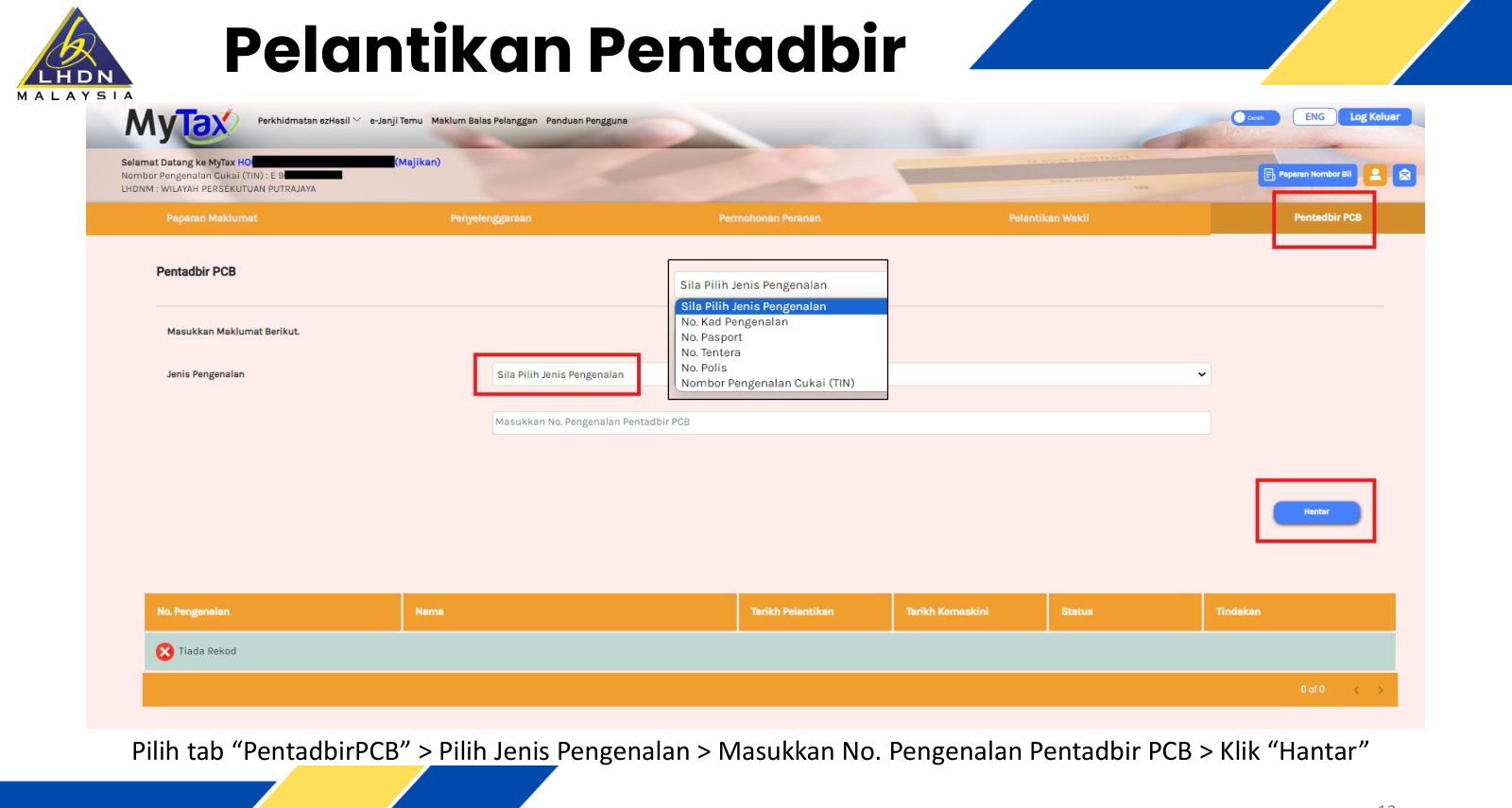
The person appointed needs their own MyTax login and tax number (TIN), plus IC or passport number, email and phone (FAQ Q6). If the director's Majikan role later becomes inactive, every appointment under it stops working (FAQ Q7), so update the roles when directors change.
2.3 One-time setup inside e-PCB Plus
- First login only: click OK, check the employer details, Kemaskini, then Simpan. Only an employer showing under Telah Disahkan can carry on (LHDN e-PCB Plus system guide, pp.6 and 9).
- Pekerja > Kumpulan Pekerja > Tambah Kumpulan Pekerja. At least one employee group is required, for example "STAFF" (system guide, para 2.4.1).
- Pekerja > Senarai Pekerja > Tambah Pekerja, by TIN, new IC or passport number. Fix anyone listed under Pekerja Perlu Dikemaskini (system guide, para 2.4.2).
What this means for you: the director does one MyTax application and one appointment; after that the payroll person works alone, under their own login, every month.
3 Each Month, Step by Step
This is the e-PCB route, the one most small employers without payroll software use. Screen labels are as printed in LHDN's e-PCB training deck (14 Feb 2025); page numbers are that deck's.
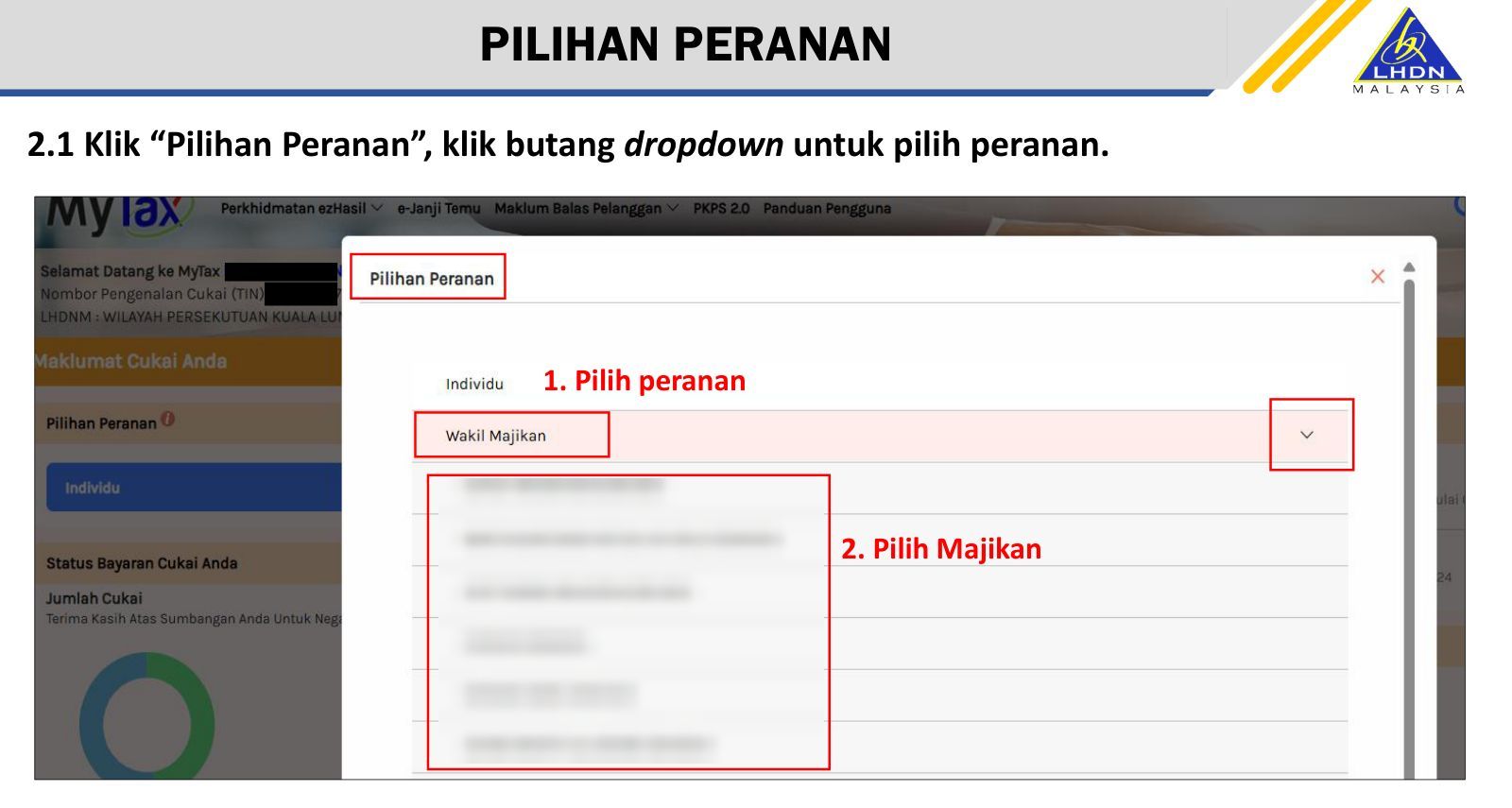
- Log in to MyTax. Under Pilihan Peranan, pick your role (Majikan, Wakil Majikan, Pentadbir PCB or Individu) and click the company name (pp.4 to 7).
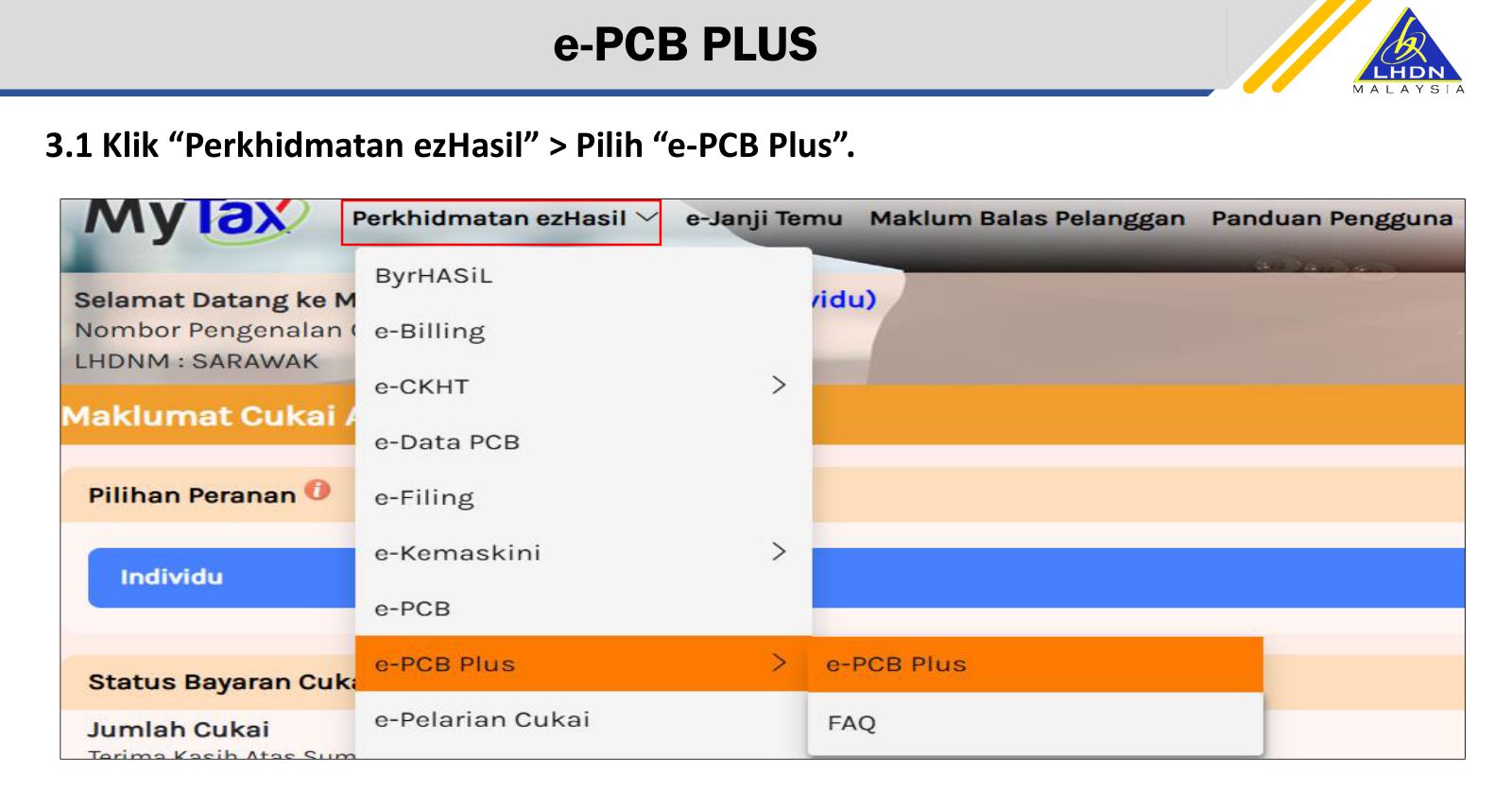
- Perkhidmatan ezHasil > e-PCB Plus (p.9). On the dashboard: Perkhidmatan > e-PCB (p.11).
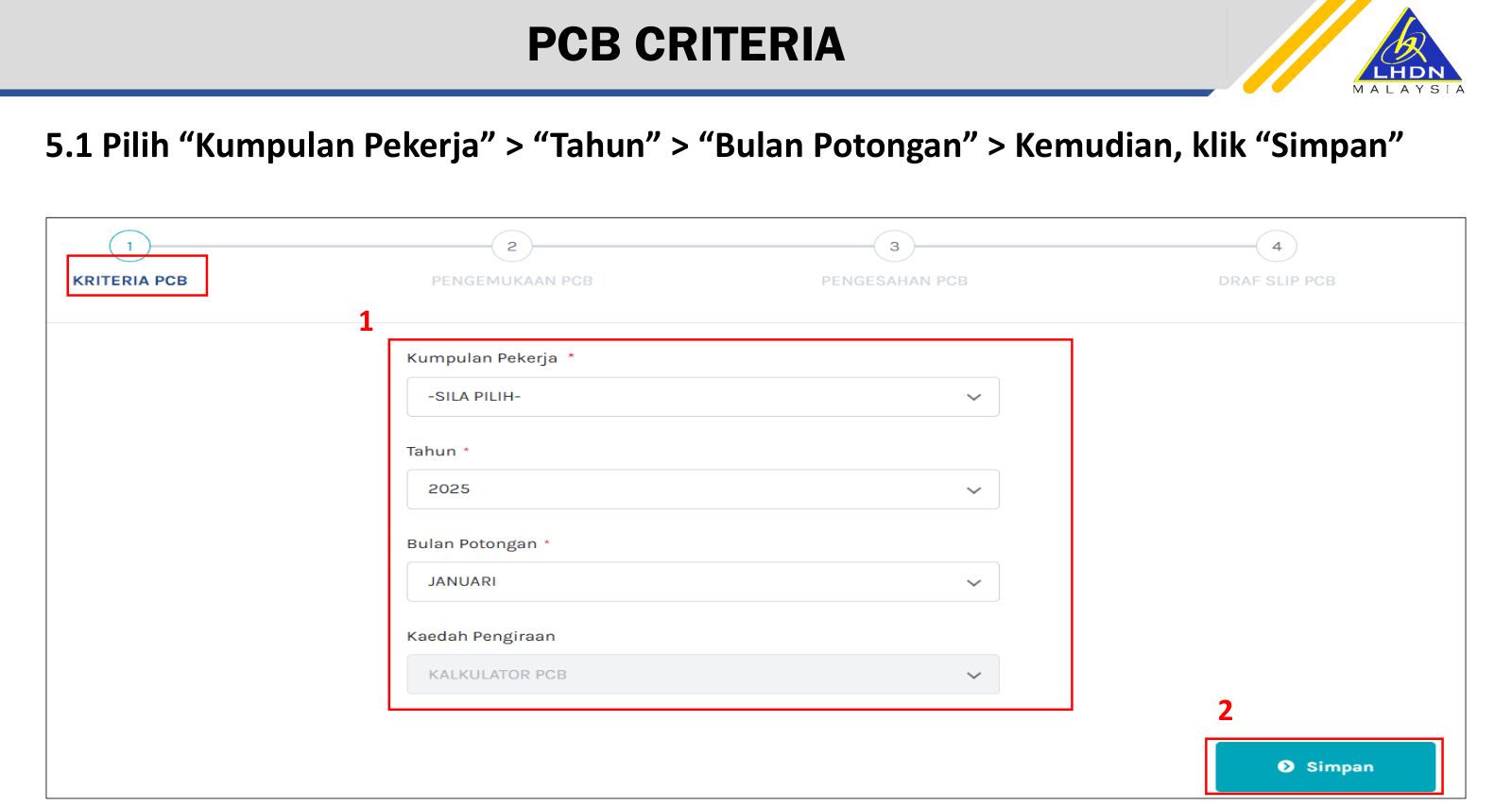
- Kriteria PCB: choose the Kumpulan Pekerja, the Tahun and the Bulan Potongan, then Simpan (p.13).
- Pengemukaan PCB: Tambah Pekerja, then Kira PCB on each employee. In the Kalkulator PCB window, if the employee worked for another employer earlier this year, first tick Pekerja ini pernah bekerja sebelum ini pada tahun semasa; then click Kira, fill in that month's pay and deductions, and Kira & Simpan (pp.16 to 20).
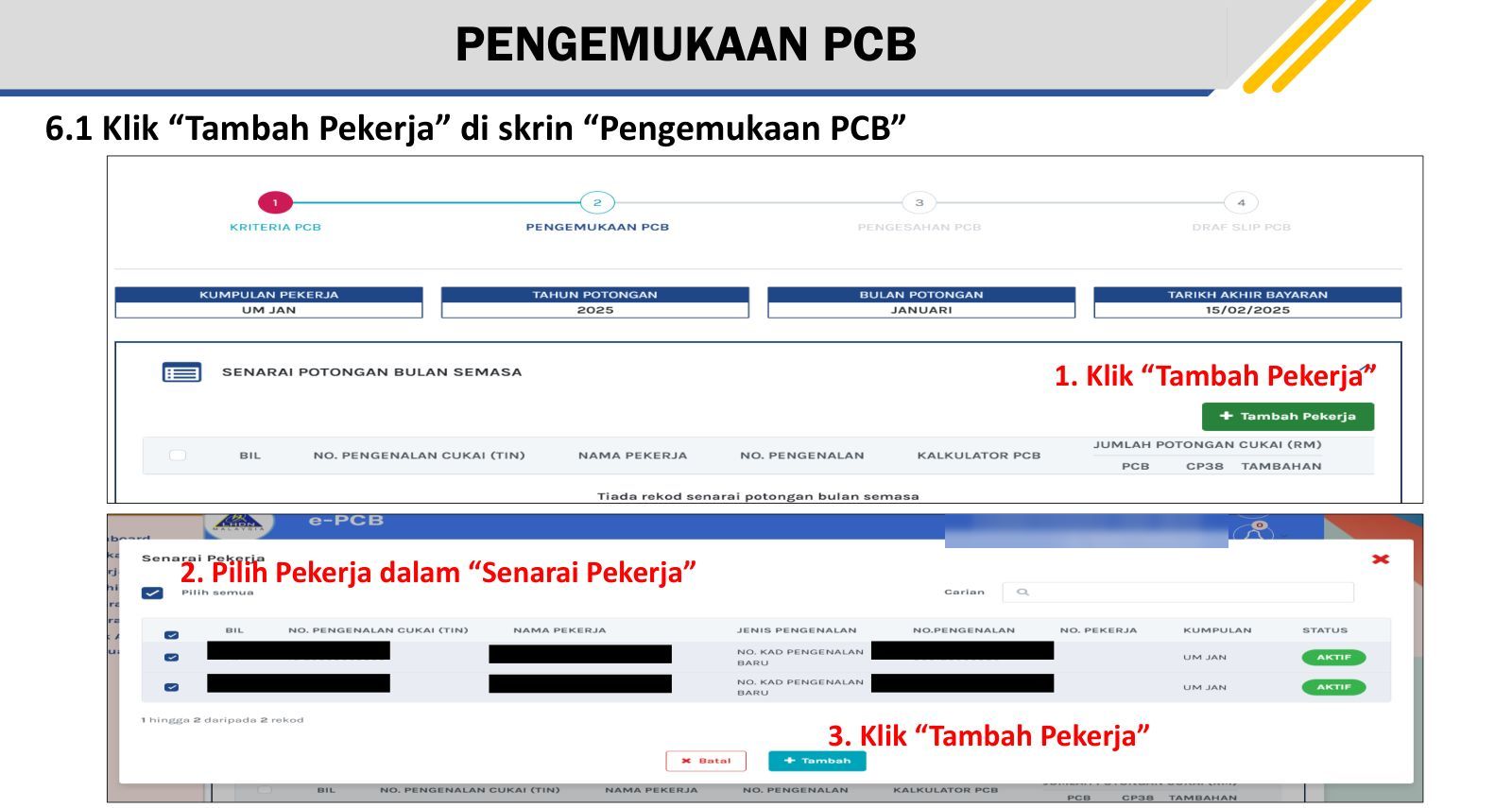
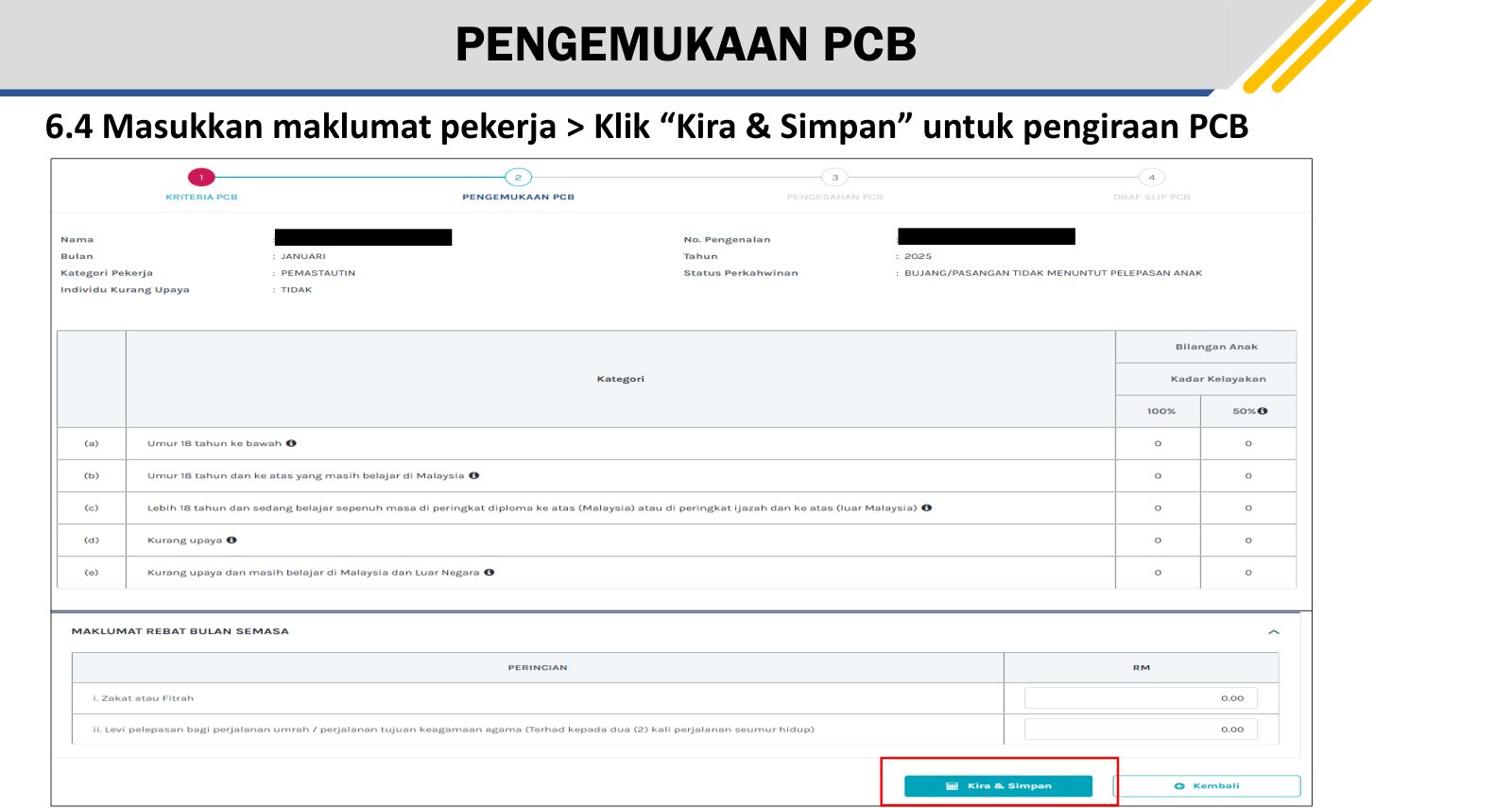
- Fill in Maklumat Pegawai Bertanggungjawab, the officer responsible, then Simpan (pp.22 to 23).
- Dashboard > Draf > Pengesahan PCB: update Jawatan, then Seterusnya and Pengesahan (pp.25 to 27).
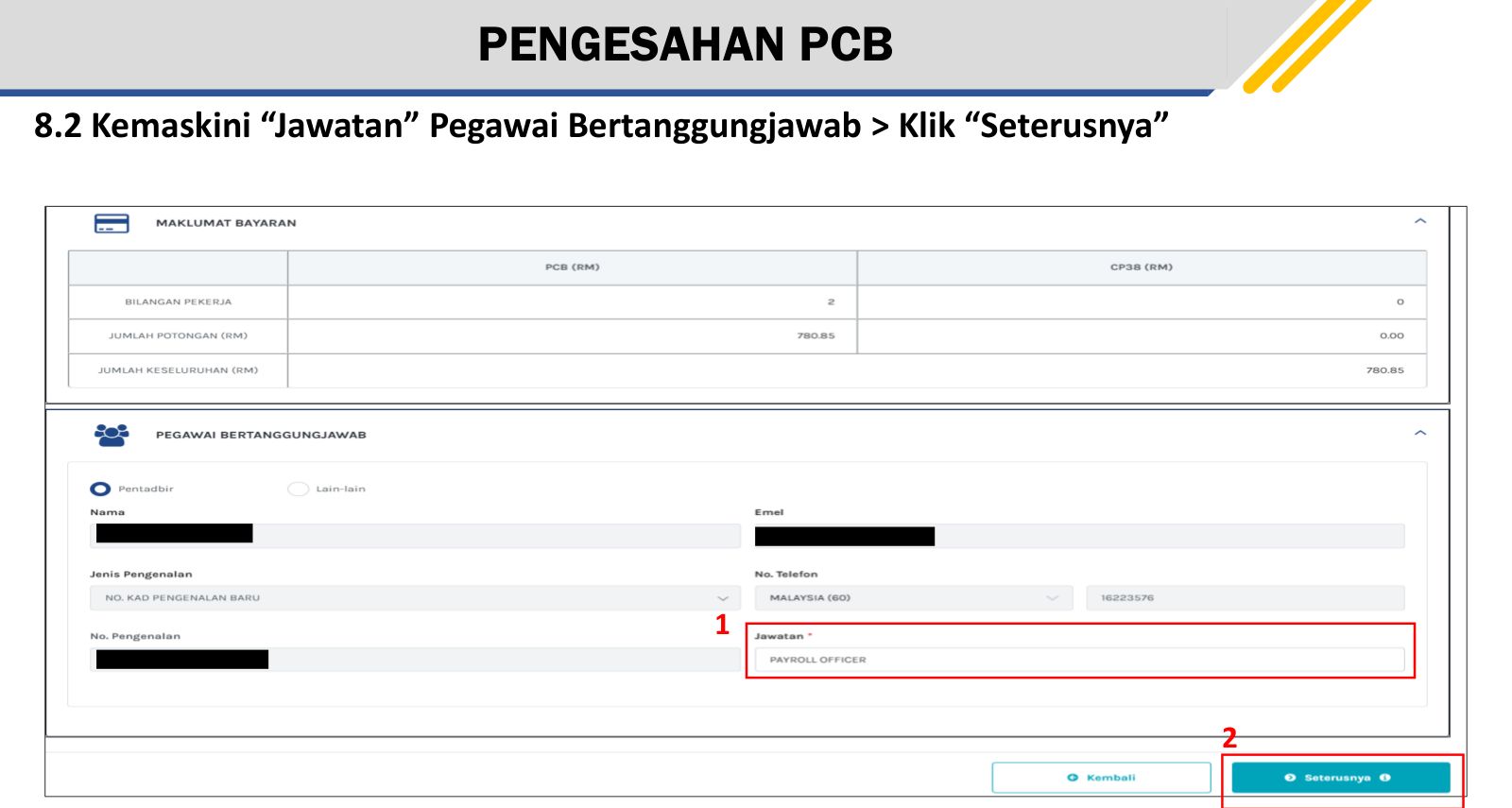
- Draf Slip PCB: Cetak to keep a copy, then Bayaran (p.29).
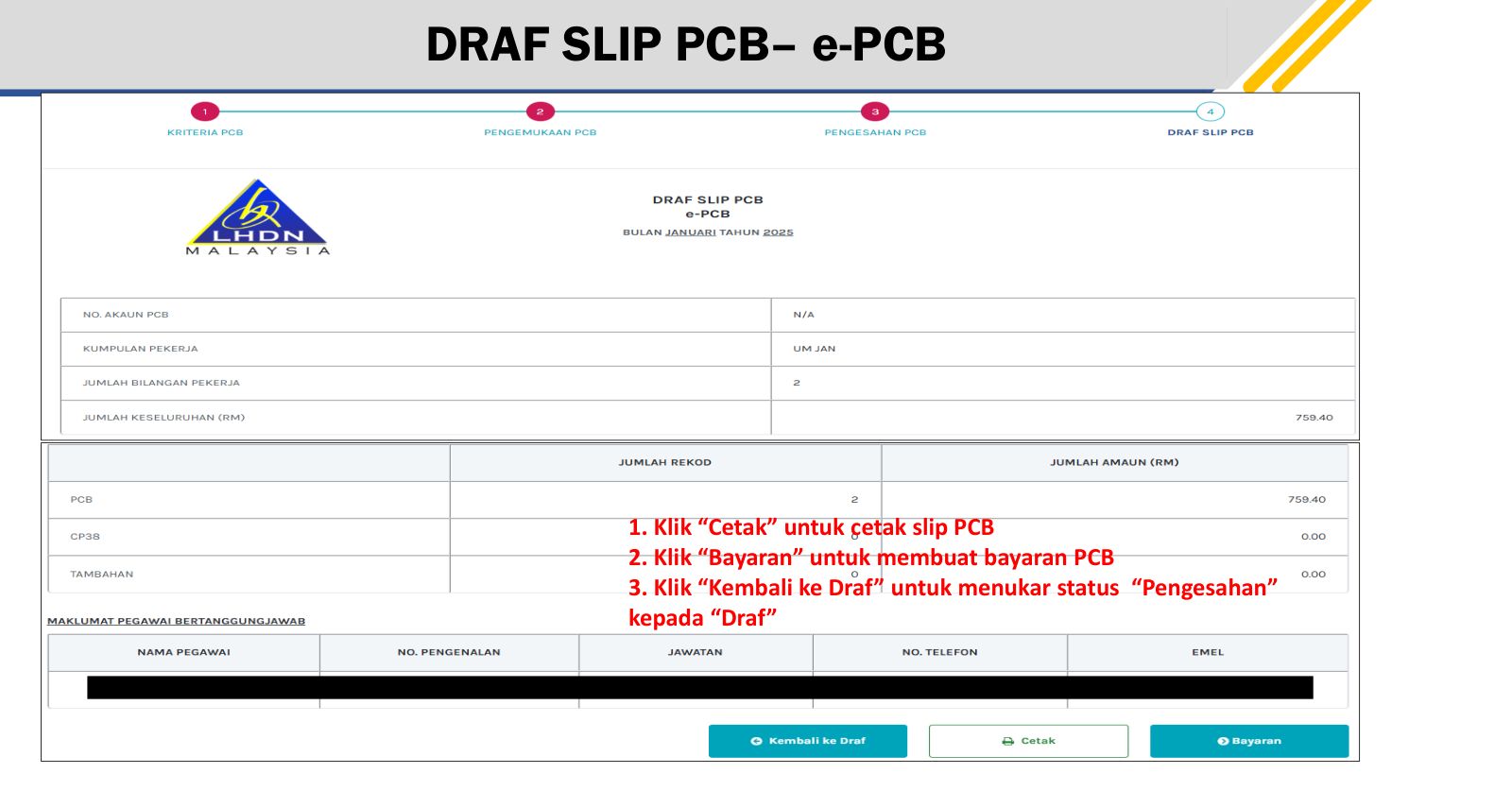
- Maklumat Bayaran > Kaedah Bayaran > Seterusnya (p.31). Pay as in section 4.
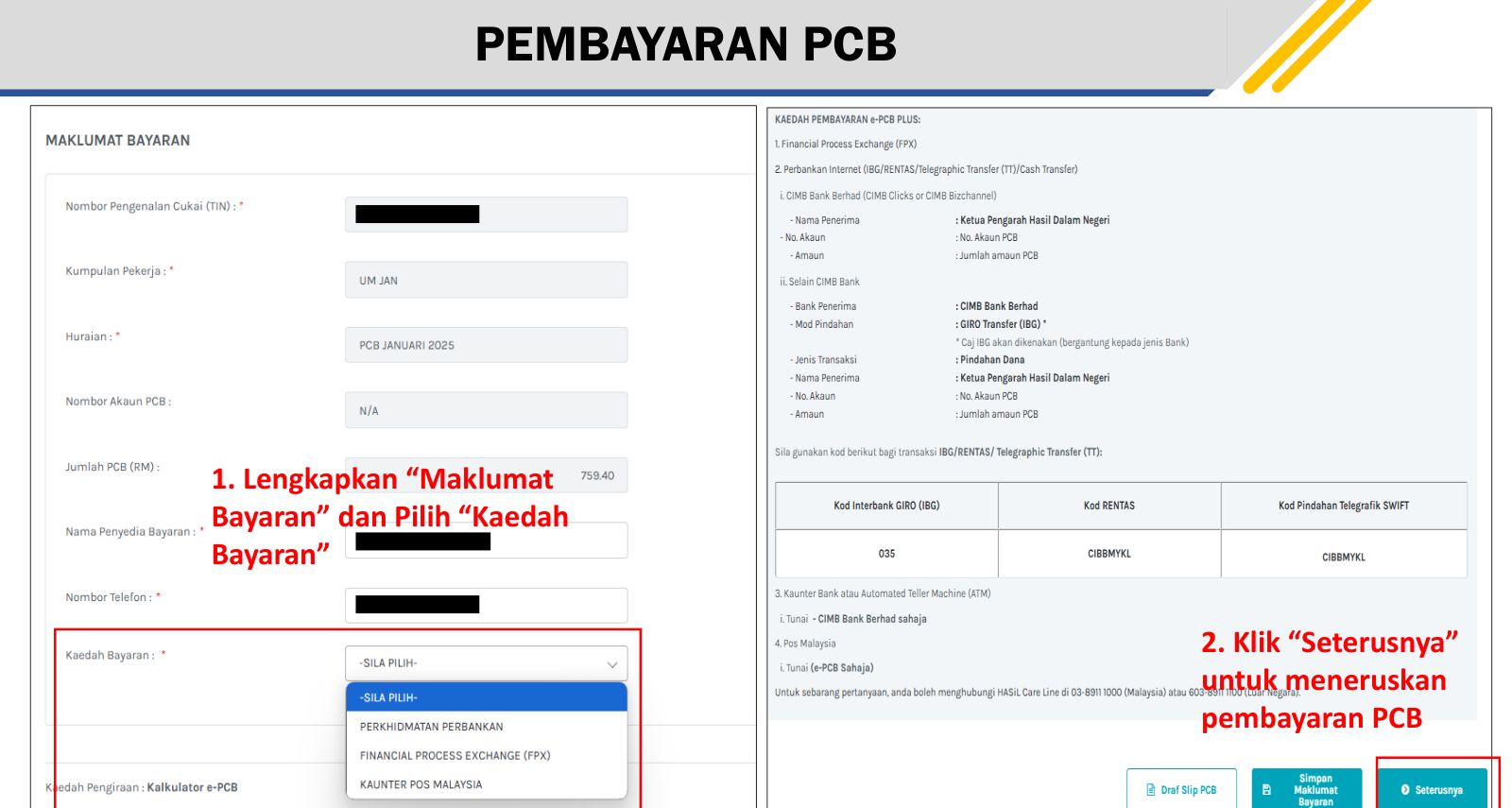
Before step 8, check every line. Once a payment method is chosen, the calculation can no longer be amended (LHDN e-PCB Plus payment guide, p.7).
What this means for you: steps 3 to 7 are where mistakes are made; step 8 is where they become permanent.
4 Paying, and What to Keep
4.1 Ways to pay
| Method | e-PCB | e-CP39 | e-Data PCB |
|---|---|---|---|
| FPX (online banking) | Yes | Yes | Yes |
| Bank transfer to the virtual account, or cash at a CIMB counter | Yes | Yes | Yes |
| Pos Malaysia counter | Yes | No | No |
Source: LHDN e-PCB Plus payment guide, para 1.1.1; channels by service in LHDN's role registration deck (14 Feb 2025), p.5.
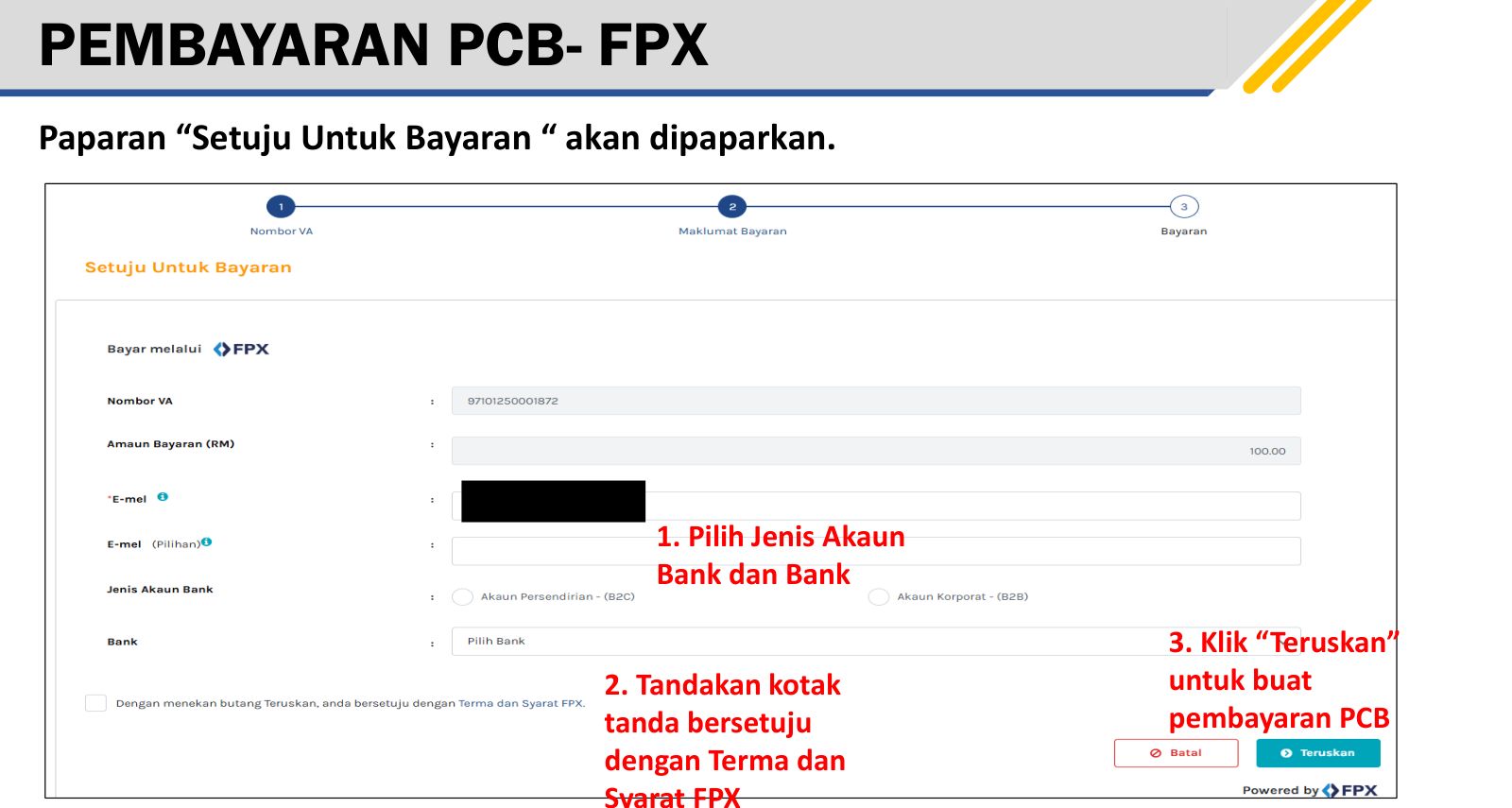
For FPX: on Setuju Untuk Bayaran, enter an email, choose the account type (B2C for a personal account, B2B for a company account), choose the bank, tick the FPX terms, then Teruskan (payment guide, pp.10 to 12). A payment started but not finished can be picked up again under Bayaran > Buat Bayaran, and checked under Semak Status Bayaran.
4.2 Proof of payment
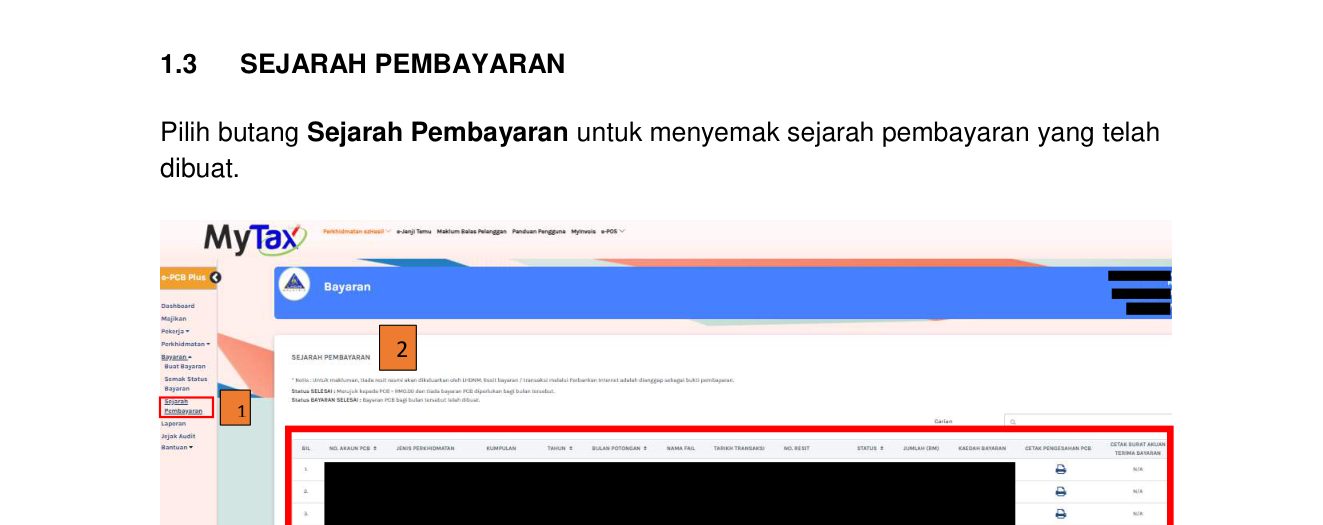
LHDN says plainly that no official receipt is issued for an e-PCB Plus payment: the bank's receipt or internet-banking transaction record is the proof (payment guide, p.16). From Bayaran > Sejarah Pembayaran, print two documents for the month:
- Pengesahan PCB, the confirmation of what was submitted; and
- Surat Akuan Terima Bayaran, LHDN's acknowledgement of the payment.
File them with the bank receipt and the payroll for that month. Under Rule 10(3) the employer must also give each employee a PCB2(II) statement of the tax deducted from them (LHDN, Pengurusan PCB slides, p.5).
What this means for you: three papers a month, filed together: the bank receipt, the Pengesahan PCB and the Surat Akuan Terima Bayaran.
5 Which Service: e-PCB, e-CP39 or e-Data PCB
e-PCB Plus offers three ways to submit. They differ in how PCB is worked out and what they expect from you.
| Service | For | How PCB is worked out |
|---|---|---|
| e-PCB | Employers without payroll software | LHDN's PCB Calculator, counting compulsory and optional deductions |
| e-CP39 | Employers without payroll software | The PCB schedule (e-Jadual), compulsory deductions only; or you key in the PCB amount yourself |
| e-Data PCB | Employers with payroll software | Upload the .txt file the payroll software produces (.zip if 2 MB or more) |
Sources: LHDN training decks, 14 Feb 2025: role registration p.4, e-PCB p.2, e-CP39 p.2, e-Data PCB p.2.
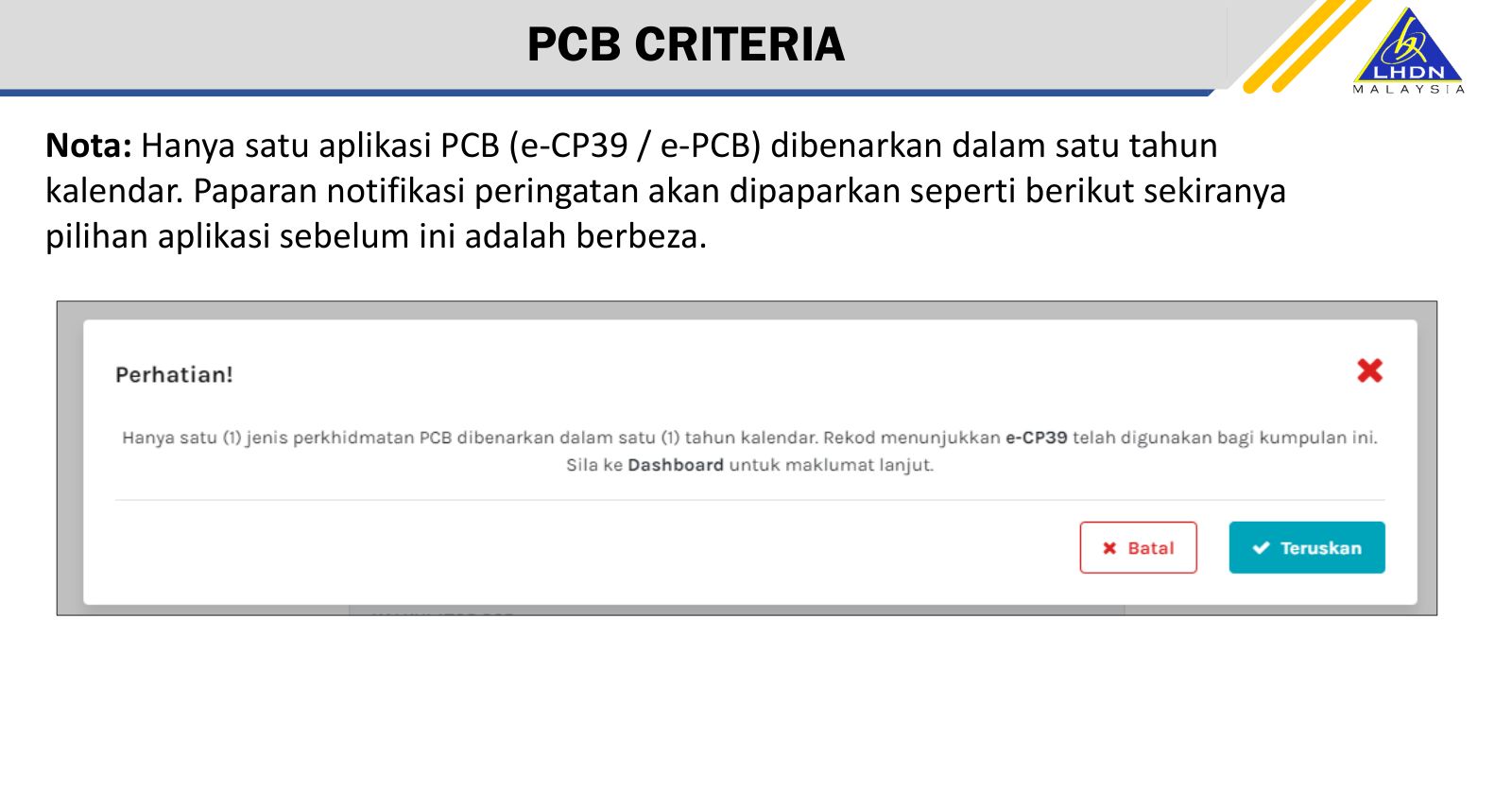
Pick one and stay on it for the year. Only one of e-PCB or e-CP39 may be used in a calendar year; you can change the next year (FAQ Q1; e-PCB deck p.14; e-CP39 deck p.14). Before the first submission of a year, look at the payment history: the Jenis Perkhidmatan column shows which service was used last month.
What this means for you: if last month went through e-PCB, this month goes through e-PCB too, even if another service would give a figure you prefer.
6 The Other Deductions on the Same Payslip
PCB goes to LHDN. The other statutory deductions go to two other bodies, through their own portals, and they are due on the same day.
| Deduction | Paid to | Due | Source |
|---|---|---|---|
| EPF (KWSP) | KWSP | On or before the 15th of the following month | KWSP, Employer mandatory contribution page, FAQ 31 |
| SOCSO | PERKESO, ASSIST portal | By the 15th of the following month; late payment carries interest at 6% a year for each day late | PERKESO, Pembayaran Caruman page |
| EIS (SIP) | PERKESO | By the 15th of the following month, with the other PERKESO contributions | PERKESO, Pembayaran Caruman page (contributions and the PERKESO & SIP file format) |
| Lindung 24 Jam | PERKESO; the employer deducts it from pay and remits it every month | By the 15th of the following month, with the other PERKESO contributions | PERKESO, Lindung 24 Jam FAQ (BM, v2.3), Q39 and Q40; Pembayaran Caruman page |
For EPF, if the 15th falls on a weekend or public holiday, paying on the next working day carries no late payment charge (KWSP, FAQ 31). We have found no such allowance for PCB in what LHDN publishes, so when the 15th is a weekend, pay PCB on the working day before.
6.1 Lindung 24 Jam: who can leave it out
Lindung 24 Jam is PERKESO's cover for accidents outside work, in force from 1 June 2026. The employee pays all of it (0.75% of wages up to RM6,000, from 1 June 2026 to 31 May 2028) and the employer pays nothing (PERKESO Lindung 24 Jam FAQ, BM v2.3, Q35 and Q36); the employer deducts it from pay and remits it to PERKESO every month (Q39). Question numbers here follow the Bahasa Malaysia FAQ, version 2.3.
- Foreign workers: compulsory, no choice (FAQ Q3, Q18 and Q19).
- Malaysian employees: voluntary since 8 July 2026, but joined by default. A Malaysian employee was out of the scheme only if they opted out on the Portal Lindung Faedah between 13 July and 31 August 2026 (FAQ Q5 and Q53).
- After 31 August 2026 no one can opt out. Anyone who did not opt out by then was enrolled automatically and stays covered: "once in, always in" (FAQ Q10, Q25 and Q26).
- A new employee contributing to PERKESO for the first time must contribute; there is no choice to make (FAQ Q27).
- An employee who opted out can opt back in at any time on the Portal Lindung Faedah, from that month's wages (FAQ Q6 to Q8).
What this means for you: do not drop Lindung 24 Jam from a Malaysian employee's payslip unless you have seen that employee's opt-out on the PERKESO record. Without it, the deduction stays.
7 If PCB Is Late or Not Deducted
- An employer that fails to deduct PCB must pay the tax it failed to deduct. It is a debt owed to the Government, payable at once, which the employer can then recover from the employee (Income Tax Act 1967, s.107(4)).
- Failing to deduct and remit PCB can attract a penalty under Rule 17 of the Income Tax (Deduction from Remuneration) Rules 1994 (LHDN, Pengurusan PCB slides, p.5).
- Failing without reasonable excuse to comply with a direction under s.107 is an offence: a fine of RM200 to RM20,000, imprisonment of up to six months, or both (s.120(1)(e)).
What this means for you: a missed month does not go away, and late payment itself can be penalised. If a 15th has been missed, pay as soon as you can and tell us the same day.
8 Glossary
| Term | Meaning |
|---|---|
| PCB / MTD | Potongan Cukai Bulanan, Monthly Tax Deduction: the employee's income tax, deducted from pay by the employer each month |
| e-PCB Plus | LHDN's system inside MyTax for calculating, submitting and paying PCB; it replaced the separate e-PCB, e-CP39 and e-Data PCB sites |
| MyTax | LHDN's online portal, mytax.hasil.gov.my |
| Majikan | The employer role in MyTax; for a company it comes with the director's Pengarah Syarikat role |
| Pentadbir / Pentadbir PCB | Administrator of e-PCB Plus; full access |
| Wakil Pentadbir | A representative with access only to the tasks and employee groups assigned |
| TIN | Tax Identification Number; every employee needs one to be added |
| Pengesahan PCB | The confirmation of a month's PCB submission, printed from e-PCB Plus |
| PCB2(II) | The yearly statement to each employee of the PCB deducted from them |
| CP38 | An LHDN instruction to deduct an extra amount from an employee's pay towards their earlier years' tax arrears |
| FPX | Malaysia's online banking payment gateway |
Common Questions
Work out one employee's PCB with our free calculator →
When is the PCB payment deadline?
On or before the 15th of the month after the salary month: October's PCB by 15 November. This is Rule 10(1) of the Income Tax (Deduction from Remuneration) Rules 1994. We have found no LHDN extension for a 15th that falls on a weekend, so pay on the working day before.
How do I pay PCB online now?
In MyTax, under Perkhidmatan ezHasil > e-PCB Plus. Since February 2025 the calculation, submission and payment are all done there, and paid by FPX, bank transfer, a CIMB counter, or (for e-PCB only) a Pos Malaysia counter.
Who can log in to e-PCB Plus for a Sdn. Bhd.?
A director who holds the Pengarah Syarikat role in MyTax; the Majikan (employer) role comes with it and makes the director an administrator of e-PCB Plus. The director can then appoint the payroll staff as Pentadbir PCB (full access) or as a Wakil Pentadbir (limited access).
Do I get an official receipt from LHDN?
No. LHDN issues no official receipt for an e-PCB Plus payment; the bank's receipt or transaction record is the proof. Print the Pengesahan PCB and the Surat Akuan Terima Bayaran from Bayaran > Sejarah Pembayaran and keep them with it.
Can I change from e-PCB to e-CP39 in the middle of the year?
No. Only one of e-PCB or e-CP39 can be used in a calendar year; you can change the next year. Check the Jenis Perkhidmatan column in the payment history to see which one the company has been using.
Do I have to deduct PCB if it works out to a few ringgit?
If the PCB worked out for an employee is less than RM10 before zakat, it does not have to be deducted. The employee must still be listed in e-PCB Plus.
Can a Malaysian employee skip Lindung 24 Jam?
Only if they opted out on PERKESO's Portal Lindung Faedah between 13 July and 31 August 2026. Anyone who did not was enrolled automatically, and no one can opt out after 31 August 2026. Foreign workers and first-time PERKESO contributors must contribute.
What happens if a company does not deduct or pay PCB?
An employer that fails to deduct PCB must pay the tax it failed to deduct; it is a debt owed to the Government, payable at once, which the employer can then recover from the employee (Income Tax Act 1967, s.107(4)). Failing to deduct and remit PCB can attract a penalty under Rule 17 of the Income Tax (Deduction from Remuneration) Rules 1994. Failing without reasonable excuse to comply with a direction under s.107 is an offence: a fine of RM200 to RM20,000, imprisonment of up to six months, or both (s.120(1)(e)).